
If only Google gave away points based on how beautiful your website is! But unfortunately for Google, it is all about the ease of access for its users. This is exactly where PageSpeed Insights comes into the picture.
“How fast does the page react when someone clicks a button?” “How long does it take before the page looks ready?” and many other such questions constitute what we know as Google PageSpeed Insights. Or, in simpler terms, if your website is healthy enough to host the users.
Read along as we discuss how to score 100 in PageSpeed Insights and what it exactly means for your business. Do not worry, it is not about the boring technical aspect, but real solutions that work!
The Honest Truth About Scoring 100 on PageSpeed Insights
Think about Google as your highly intuitive friend who keeps saying, “No, something doesn’t feel right.” That's exactly what PageSpeed Insight is. Google does a thorough inspection of your page before it redirects users, and in most cases, it doesn’t like what it sees.
To begin with, Google doesn’t analyze your code or programming knowledge, but as the internet calls it, just the “vibes.” In other words, how does the page feel to your users? Technically, it is known as the Core Web Vitals, or the only pointers that truly matter when checking the insights. They are mainly as follows:
Largest Contentful Paint (LCP)
This is Google checking how long it took for the main aspects of your page to show up. As in, the moment it landed on your website, how long did it take for the:
- Big headline
- Hero image
- Main banner
- Main content block and other essentials
Or, in our common terms, how long did it take for the website to load? If the LCP is slow, users get frustrated, they bounce, and well, Google thinks your site is broken.
Interaction to Next Paint (INP)
Google also checks how long it takes for your page to respond when someone clicks on something. Or, in other words, you click a button > nothing happens > you click again > and it reacts late.
A low INP makes Google think that your site is broken and is not in good enough condition.
Cumulative Layout Shift (CLS)
This is when everything moves around when you click on the website. Or, in simpler terms, Bad CLS is when:
Text loads > Then an image loads > Everything shifts down > You click the wrong thing. Google hates this more than the users because this hints that your site is unstable. CLS = trust! A stable page feels reliable.
First Contentful Paint (FCP)
A supporting metric, this is the timestamp or instant when the first content of your page appears. Think about it this way: a blank page means panic; users think there is something wrong, and they bounce.
Time to First Byte (TTFB)
In one simple line, this means how long it takes for the server to reply, or in other words, for the website to realize someone is here. This is not about design, but your hosting, caching, and servers. Yes, Google keeps an overall watch on everything.
🚨Now that you know what exactly goes into determining your PageSpeed Insights, here is the thing: Scoring a full 100 on the insights is usually not necessary, pointless, and goes against your marketing strategies. Think about it this way: a full 100 on the score means:
- Every image must be perfect
- Every script must behave
- No third-party tools should slow you down
- No ads
- No trackers
- No heavy fonts
- No marketing scripts
This is a completely unrealistic restriction for Businesses, Blogs, SaaS, and every other marketing website. Or, in other words, blindly chasing a perfect 100 because some random SEO blog told you so is never a good idea!
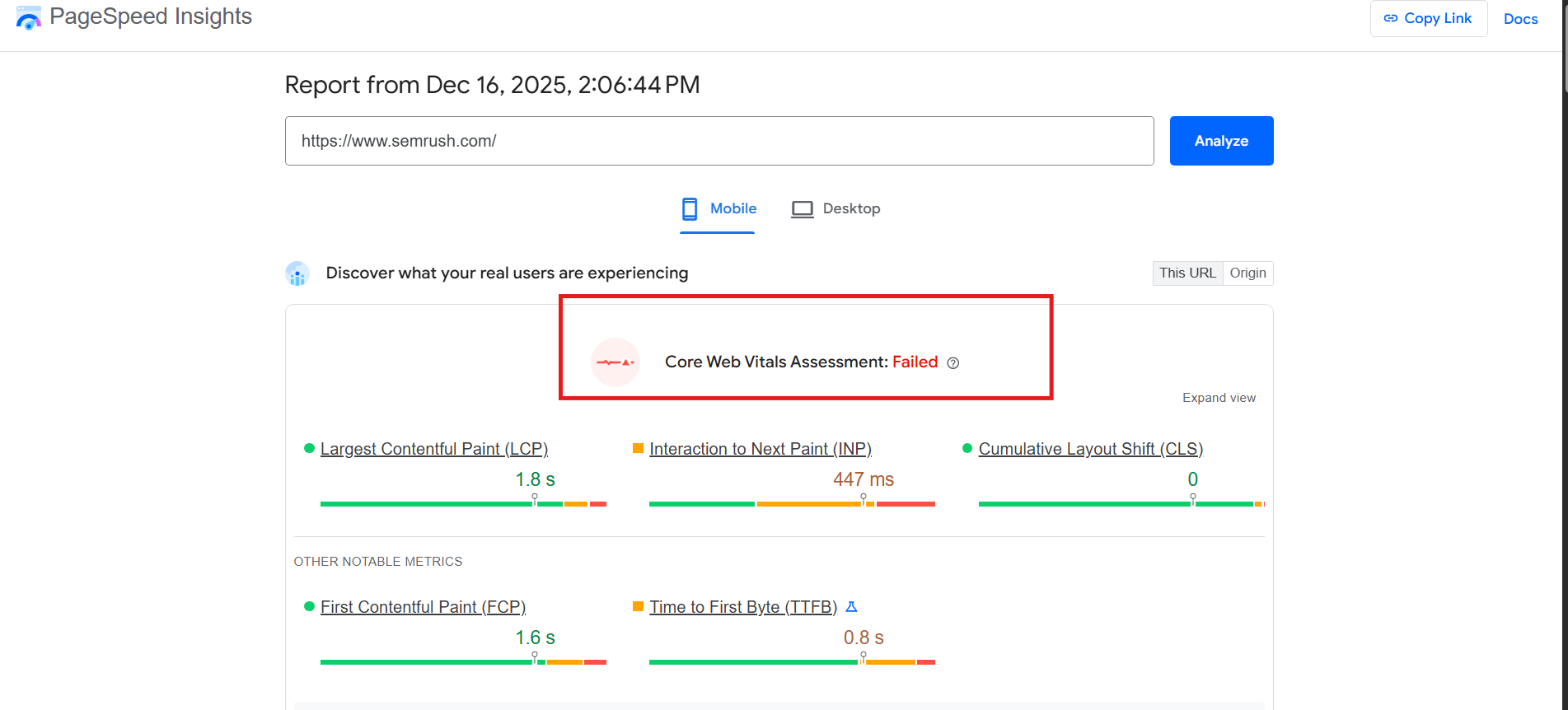
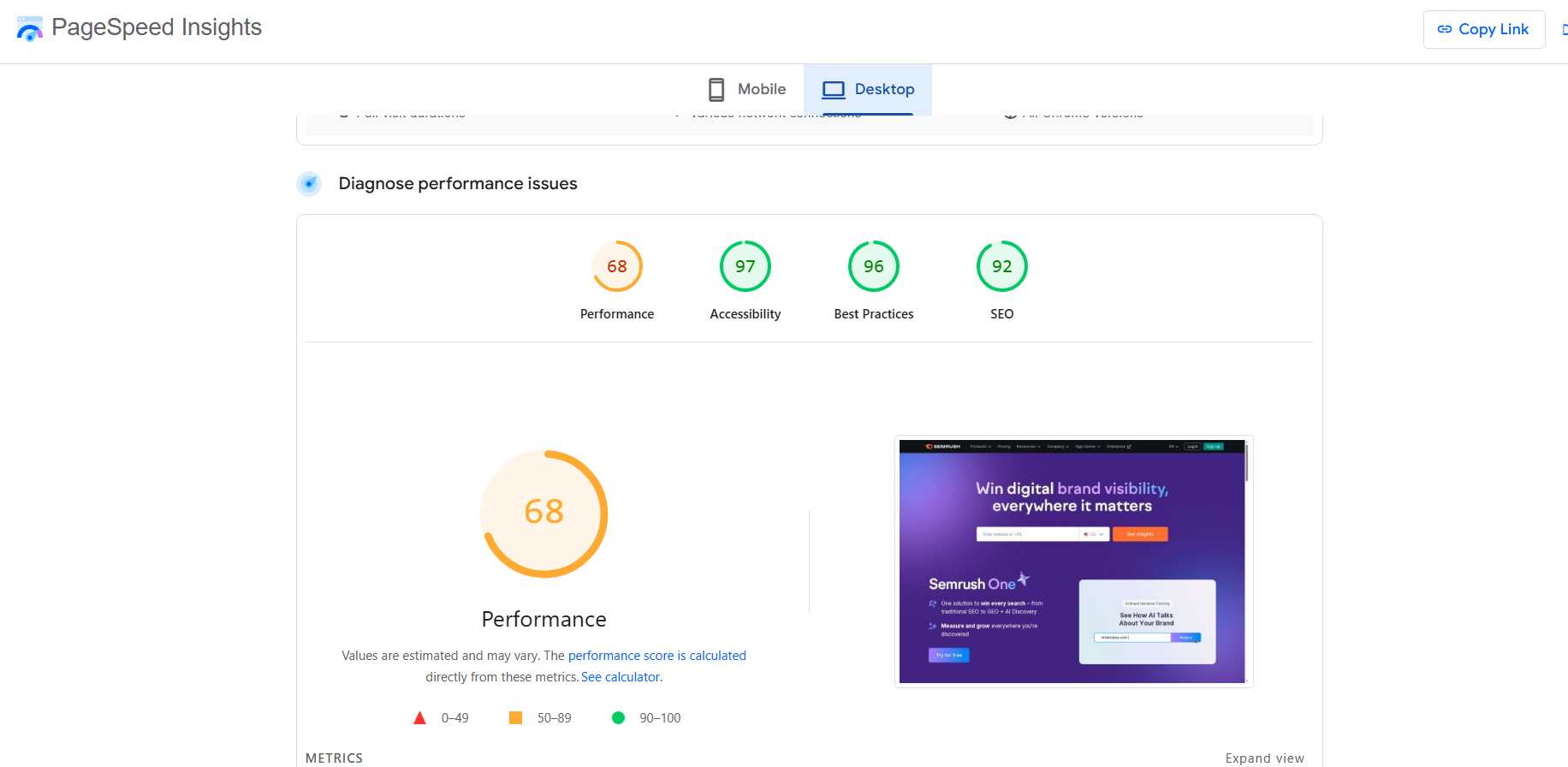
Ironically enough, one of the top SEO websites at the moment, Semrush fails this test gloriously with a humble 68 for both its mobile and desktop versions.
Why Big Websites “Fail” PageSpeed Insights (And Still Rank Just Fine)
Now this is where things get tricky because even with a 68 score in the insights, Semrush never fails to rank on Google. Not only that, you will always see that it is being quoted by AI overviews and all the other AI search tools.
So hold on! What does this mean then? Are PageSpeed Insights important? Or, should we just sleep on it?
Here is the thing: websites that have analytics, tracking pixels, fonts, A/B testing tools, consent banners, chat widgets, and glossy pop-up ads will almost never score a perfect 100. But this doesn't mean that they are bad with SEO.
Actually, what Google really cares about are the same things you notice when you land on a website. Which is:
✅Loads reasonably fast
✅Responds in sync when you interact with it
✅Doesn’t feel like a break when you scroll through it
✅Feels stable and usable on real devices
This is why big-shot names with an average of 60–80 range, pass their Core Web Vitals, and for Google, that is a win!
Another important thing: if all the added elements in your website make it more accessible, usable, and satisfy the user's search intent, Google doesn’t mind the low score. Or, in simpler terms, “A slightly lower score with solid user experience can still rank extremely well.”
This is also one of the many reasons why blindly copying PageSpeed recommendations without understanding why they exist sabotages the entire thing.
How You Should Actually Approach PageSpeed Insights
As a marketer, you have to take care of your PageSpeed Insights, but not in the way that you think. To begin with, the PageSpeed Insights are more about where your users might struggle and not how perfect your website is. This is exactly what makes all the difference.
You have to consider PSI as another tool that knows exactly what your users want. Nowhere does it say that you need a perfect 100 to make sure everything is alright. It is all about asking a few simple questions:
- Does this page load fast enough for the users?
- Does it respond quickly when someone interacts with it?
- Does the layout stay stable while loading?
- Does anything feel broken or delayed?
So, instead of focusing on the overall score, you must keep track of your Core Web Vitals. Moreover, your focus needs to be on real concerns like :
- Are these problems visible to real users, or only to the tool?
- Which of these issues are actually hampering the real user experience, and etc.
Why Your PageSpeed Score Keeps Changing
This is where most people get confused and mess up the entire concept of PSI. You must understand that you are looking at two different kinds of data when you run the test.
Lab Data
This is when Google analyzes your website in a controlled environment, and with a steady device and network speed. It doesn’t involve any real user behavior.
It is a helpful chunk of data that helps you understand where your website stands, but it is not the reality.
Field Data
Field data is the live data that you get from your real-time users. It keeps a track for twenty-eight days with different devices, internet speed, user behavior like scrolling, clicking, interacting, etc. (Google pulls it from the Chrome User Experience Report (CrUX).)
Now, this data is more trustworthy because it reflects actual user experience and reflects long-term usability. More than anything else, this is also why you see:
- A fluctuating PageSpeed score
- But a stable “Core Web Vitals: Passed” status
One more thing you will always notice is that your mobile version scores are always lower than your desktop version because:
- Mobile devices have slower processors
- Network conditions are weaker and unstable
- Touch interactions on mobiles take longer to register
This doesn’t really mean that your site is bad on mobile, even though Google uses mobile-first indexing. All you need to worry about is passing Core Web Vitals, and that is it!
The Right Way to Use PageSpeed Insights (Without Sabotaging Your Site)
It is good to have a handy report card only when you are clear about its implications. Or, in simpler terms, when you blindly follow PSI and strip down the features in your website, it does you more harm than good.
You must understand that your PSI doesn’t understand a few basic things:
- Your marketing goals
- Your conversion tracking needs
- Your user behavior analysis and so on.
So, the moment you get panicked by the “low” score and undo every remarkable detail in your website, you lose out on the user perspective. To put it more clearly, a 60-90 score is completely fine as long as you:
- Fix issues that visibly affect users
- Improve metrics that fail consistently
- Optimize your content without disrupting its functionality.
Honestly speaking, a 100 score is great for demo pages, landing experiments, or minimal sites. But, for real businesses, blogs, SaaS platforms, and content-driven websites, it is always impractical and unnecessary. What you really need are:
- A green Core Web Vitals
- A fast-loading page
- Smooth interaction with decorated elements
- The page experience that doesn’t frustrate users.
Final Takeaway: Optimize for Humans, Not the Score
Now, having a dedicated score system for your page is an asset only if you know how to use it. If you follow the PSI way, you will end up with a website that has no glitz, glamour, or pop-ups.
In a marketing setup that is nothing but self-sabotaging, your entire business. So, you need to be resourceful with all the information you have instead of being overwhelmed.
You must remember that this entire concept is not about appeasing your vanity, where a number decides your worth. But it is something more in-depth, logical, and yet simple.
PageSpeed Insights is not your enemy. It is a detailed insight into how your users perceive your website. Or, a data goldmine to fix things as per their way, instead of just blatantly chasing a number.
Because Google is happy even if the score doesn’t reach 100!