
Let me guess, you are here because you have two documents with identical texts and you need a way out. There are minute details you might have missed in one, or changes that need to be addressed in the other. And you are wondering if only there were a technology!
I mean, you cannot “Ctrl F” out of this problem with a 2000-word document. Especially when you are not sure what you are looking for. Enter the AI Text Compare! An efficient solution that compares two texts in seconds.
Read along as we discuss what this is all about and how it can be the much-needed upgrade to your workflow. Not to mention how you can do all this and more with the most intuitive text formatter online. 😜
What Is A Text Compare Tool?
Simply put, it is an AI-powered setup that helps you compare two given documents containing the same text. With a Text Compare tool, you can identify whether Document A is different from Document B by its changes in its structure, sentences, wording, and formatting, which includes:
✅ Any edits made in the sentences.
✅ Newly added words or sentences.
✅ Number of words and characters.
✅ What are the lines that have been changed
✅ Are there any removed phrases from document A to document B and so on.
Why Compare Text Online?
A text comparison tool is usually designed or built keeping precision and urgency in mind. Think about it this way: you have a 3000-word document that has been edited, and you need an update on the changes.
It is either a client that is waiting on the call or an urgent report that you have to submit. Or, maybe your student has finally made the edits you asked for, and now you need to retrace them. What do you do? This is where a Text Compare tool serves many purpose and the reason you need to rely on this flawless AI setup is that:
- It conveniently helps you avoid manual proofreading errors. Nothing escapes the sharp eye of our AI-powered setup.
- Our AI Text Compare is a guaranteed collaboration success story. You get instant access to all the changes and keep track of them as well.
- Sometimes it can be a great asset when you are submitting after the first round of edits, and there is a certain protocol that you have to follow.
- You never miss out on critical edits, especially when multiple people are working on a document.
- An intuitive setup like this also ensures you get faster approvals and flawless submissions.
How to Use the Text Compare Tool Online ( A Step-by-Step Guide)
Using the Text Compare tool by HumanizeAI.io is firstly a piece of cake. It is one of the finest examples of how AI can be one of our biggest assets if used and designed efficiently.
To begin with, you don’t need to sign up anywhere, download any extension, or subscribe to a premium plan. You simply click on the link and get straight to comparing your documents. Here’s a quick overview of the same:
Step 1: Open the Text Compare Tool
You click on the link https://www.humanizeai.io/tool/text-compare to start working with our Text Compare Online tool.
Step 2: Paste Both Versions of the Text
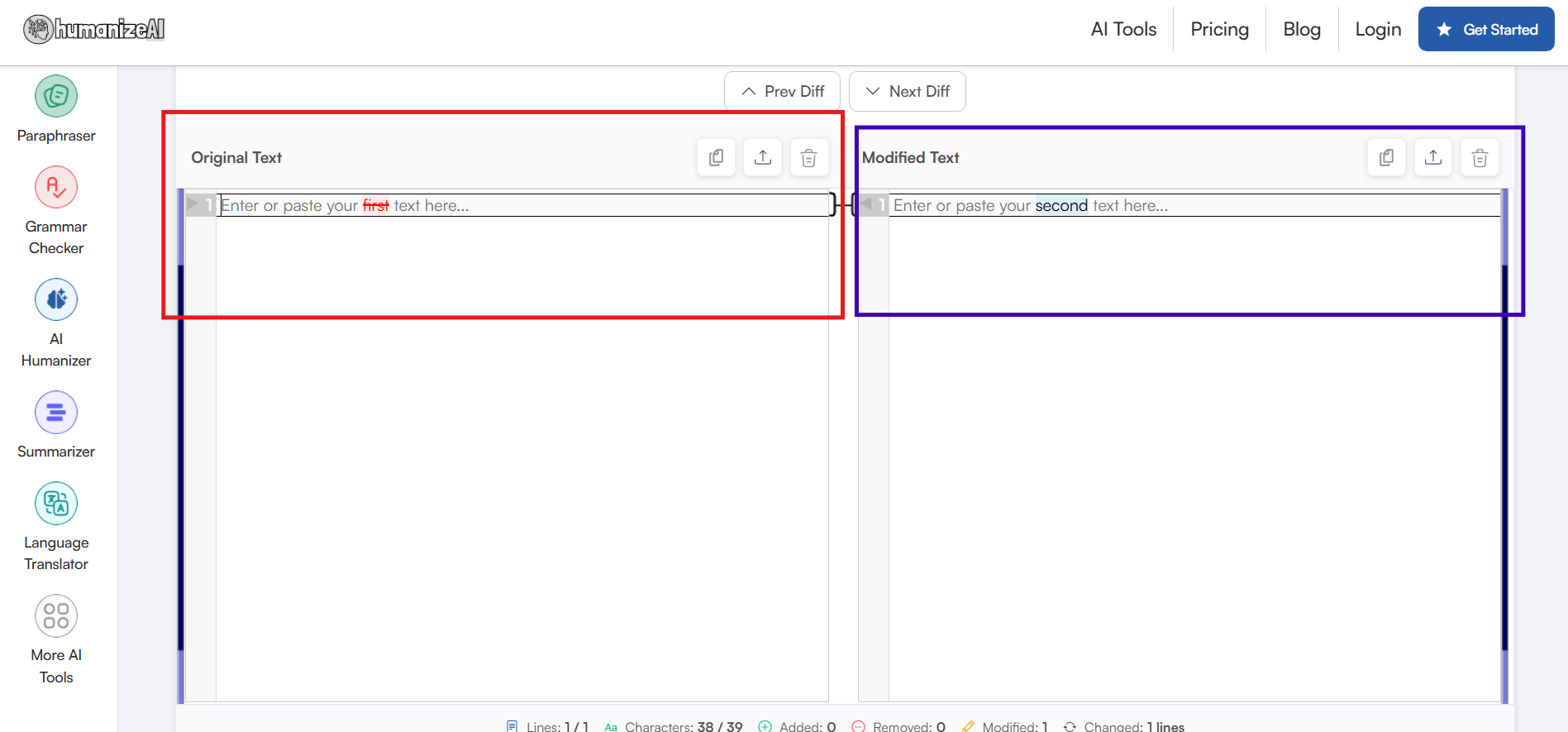
The link takes you to the main dashboard, where you begin by pasting the two identical texts that you have.
Step 3: Review Highlighted Differences
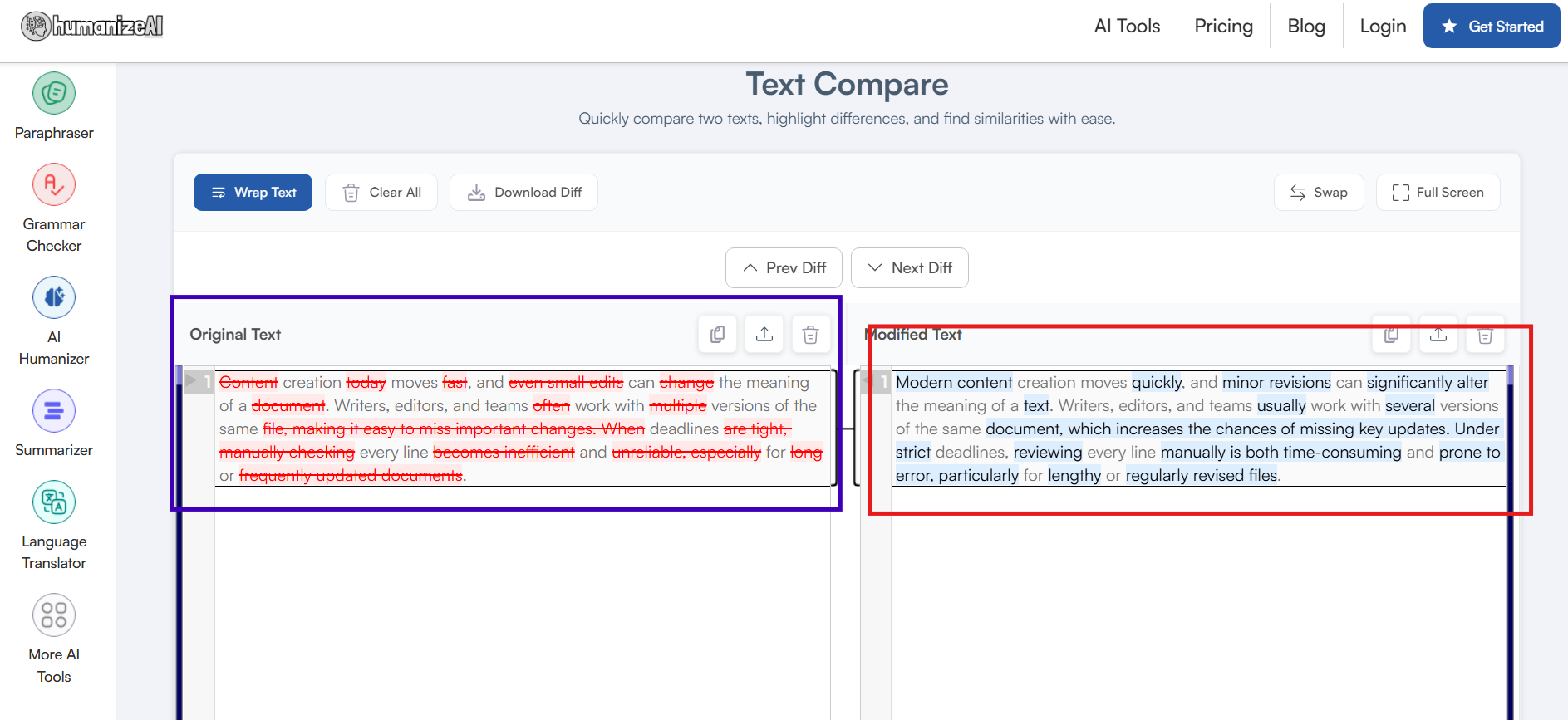
Well, technically, step 2 is the final step since this one is all about reading and identifying the changes made to the final draft. All you have to do is check both the text panes and the tool will automatically highlight the changes in dedicated colours.
This way it ensures you keep track of every word, every sentence, and every paragraph break as you move ahead with your edits.
Step 4: Assess, Verify, Track All The Changes
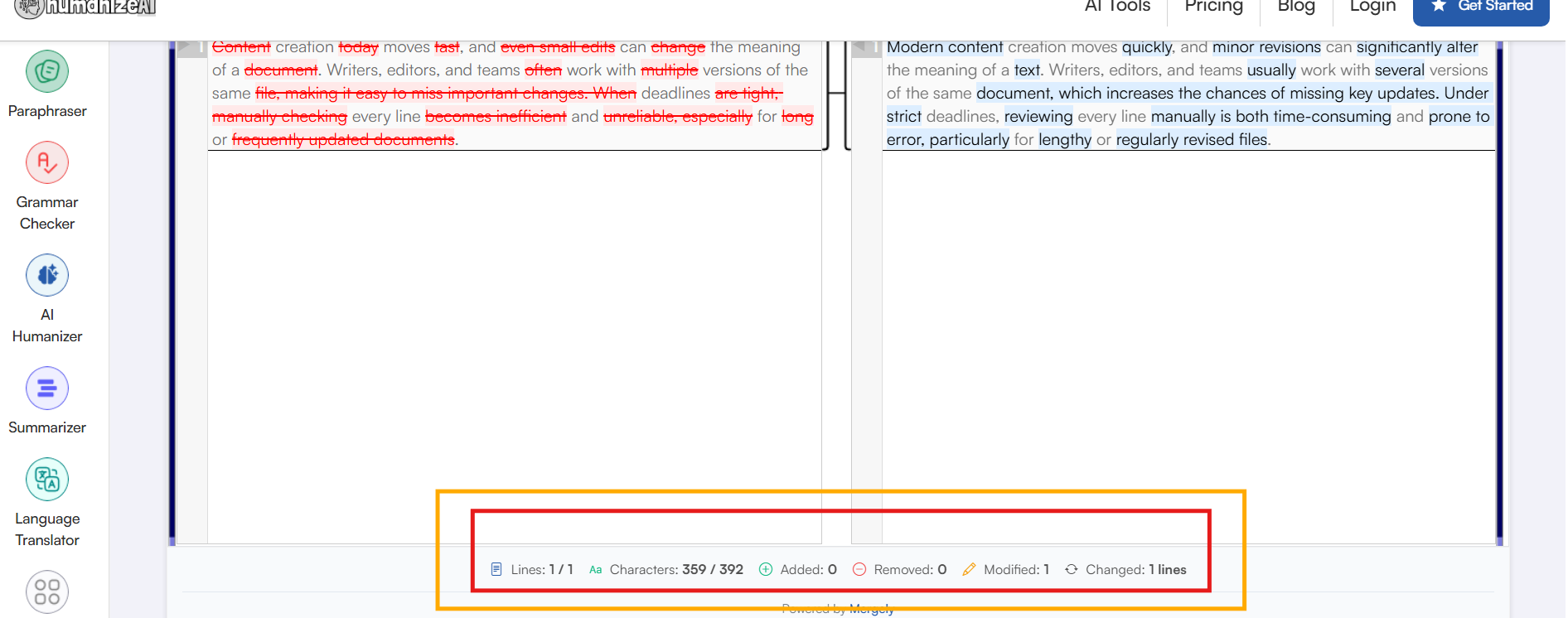
This is more of an added advantage than a step of relying on a tool like HumanizeAI.io’s Text Compare. You get to track all the necessary edits or changes in one dedicated slab, making things easier and more convenient for you.
Step 5: Download The Difference
With HumanizeAI.io’s Text Compare, honestly, you are always one step ahead. Think about it this way, it is not everyday that you get a tool that lets you download all the highlighted changes in one dedicated report. Simply click on the Download Diff button, and you have all your changes marked and organized in one place.
PS: You can also copy the entire text from the left or right pane as well for direct access.
Features Of the Text Compare Tool You Should Know About
If you are trusting a tool with a critical assignment or project as a user, you should know all there is about it. You can never be sure enough of when a certain feature can come in handy.
To begin with, the Text Compare tool by HumanizeAI.io is built keeping you in mind a lot of user needs. Since it solely focuses on your ease of access and the many challenges you might face while working on a tedious task like comparing texts. With this tool, you get everything handy:
- Sentence-level Comparison: With easy visual markers, you are able to establish if the sentences differ in the two documents.
- Word and Character Difference Tracking: You will always have a ready-made bar that shows the changes in the words and characters of your text.
- Line-by-Line Change Detection: Keep track easily of how many lines are added, removed, modified, or changed with every text you paste.
- Left and Right Pane Switching: Easily swap the right and left panes of your document depending on your submission needs and editing habits.
- Multiple Text Handling with Wrap Text: Work with multiple texts simultaneously and keeps everything organized with the “Wrap Text” button. A dedicated feature that ensures no text overlaps with the other as you keep adding to the list.
- Distraction-Free Full Screen Mode: Rely on the Full Screen mode to work without any distractions or notifications that might delay your work further.
All in all, it is a well-designed setup that knows how to handle comparing documents with accuracy, consistency, and most importantly, with ease of access.
When Should You Compare Text Online?
To begin with, there are no restrictions on when you can use our tool. It is a free-for-all setup for anywhere in the world. However, our online text comparison tool is especially useful in specific situations where accuracy and speed matter the most.
- Imagine you have the revised version of a document and need to quickly point out the changes. However, sitting with each detail since the last draft by yourself can be stressful and can even lead to erros.
- You know those client feedback, editorial reviews, or stakeholder revisions, where a minor edit can cause major repercussions. This is where you rely on our free AI Text Compare tool to save the day.
- You can also use a text comparison tool before final submission. Whether it is an academic paper, a report, or a professional document, reviewing differences ensures that all requested edits have been implemented correctly.
- When multiple people contribute to a document, you need an easy way for you to identify all the changes. With our free AI-powered text-to-text comparison tool track individual changes, reduce confusion, and maintain version control.
Text Compare Tool vs Manual Proofreading
You can always rely on your proofreading skills to get you through the day. There is no doubt about that. However, sometimes when the submission is due or the client needs an immediate copy, it is only human to miss out a few details here and there.
This is why a trusted tool like our free AI Text Compare tool can be your ultimate helping hand. The thing is, unlike manual proofreading, a text compare tool automatically detects every addition, deletion, and modification without any errors. In other words:
- A text comparison tool is faster than manual proofreading and can work with multiple documents in seconds.
- It is always accurate and never misses out any single detail, and ensures no edit goes unnoticed.
- Manual proofreading can be a great alternative for tone checks and the mood of your content. However, a text comparison tool focuses purely on picking out the changes, no matter how insignificant they are. This is why it is always a step ahead when it comes to tracking edits and maintaining consistency.
Is Text Compare Online Safe and Private to Use?
It is only normal to wonder is it safe to rely on a tool with documents that are private or confidential. We understand the anxiety and pressure of data confidentiality and how critical it is to maintain data privacy. This is why, with our setup, you can be assured of a few simple things:
- There is no login or sign-in required for you to work and compare your text with our tool.
- We don’t store your information. The text you paste into the tool is processed only to identify differences, and it is never saved, logged, or stored on servers.
- All text processing occurs within the active session. Once you close or refresh the page, the text is erased, and you have to start all over again.
- We don’t use your text for training, analytics, or any third-party sharing. Our entire setup is built on comparing your text and discarding it immediately once done.
In simple terms, with HumanizeAI.io’s free Text Compare tool, you are in safe hands. Since you get to work with a setup that understands the compliance around data safety and maintains it diligently to the core. Because, for us, making sure our users are comfortable is what matters the most.
Making Text Comparison Simple and Reliable
Sometimes, you may find yourself in a situation where you wonder whether an AI tool exists to handle it. Comparing and having a detailed analysis of the same content with different edits is one of them.
This is why relying on a tool that is trustworthy, efficient, accurate, and smart is a must and non-negotiable. Whether you are checking client revisions, reviewing before submission, or preparing a document for a speech or final call, our free Text Compare tool ensures that no critical change goes unnoticed.
Not only does it vouch for your data security, but makes sure you have everything that you need with smart features and an intuitive interface. Or, in simple terms, our Text Compare Tool is a practical solution for anyone who needs clarity, consistency, and control in a few clicks!