

Currently, we have two problems. One, writing an email is not just a standalone task anymore. Second, multiple AI email writers in the market promise to do it for us.
Now, with emails, things are a bit precarious, as one email can either make or break the relationship. Be it a submission, job application, new client email, or even a daily catch-up. Emails are the backbone of modern workflow.
That is why we tested the best free AI email writers for 2026, to assess which tool can be your ultimate go-to option for all your email writing needs.
Read along as we make things easier for you one step at a time. As we analyze the email writers in real-time for their function, creativity, and most importantly, supported by live screenshots. 😁
But before that, let us set the expectations and define exactly what we should look for.
Writing an Email Is No Longer a Single Task
Before we take that sigh of relief, thinking that we have the best tool, it is necessary to understand what “ideal” means. To begin with, honestly, even ChatGPT can write emails and save us all the hassle. But the problem is, we don’t want the same old generic template each time. We need emails for multiple reasons.
- Sometimes our team member can be going through a slump
- We need to launch a new product
- There is an urgent need for a cold outreach
- Sending that important proposal to the client
- Applying for that dream job
- Submitting for admission.
And so on and on and on. This list, needless to say, is never-ending. That’s why we need a setup that can creatively oversee all of this while remaining fast, efficient, and context-aware.
Many tools assume that writing an email is only about generating text. In reality, the text is only one part of the process. The important aspect is in assessing how that email is going to be perceived by the recipient and what action it can encourage.
This is why we needed a test that goes beyond a simple discussion.
How We Tested AI Email Writers for Real-World Use
We put the top free AI email writers in the market through a standardized test. The goal was not to judge how much text a tool could generate, but how well it supported decision-making, tone, and clarity, and most importantly, understood the given context.
The input we used: My manager accidentally CC’d me on an email complaining about me. Now I need to respond professionally.
The Output We Were Looking For:
- It makes a quick draft.
- Is there any space for additional context?
- How well it handled tone sensitivity, emotional balance, and the intensity of the situation.
- Did the generated results require manual edits?
The Process We Followed:
- Each tool was used in its basic version.
- There was only one attempt without any added edits.
- The rankings were based on how they reacted to the intensity of the situation.
How We Evaluated the Responses:
- Did the email writer acknowledge the situation without sounding defensive?
- If the tool avoided overtly robotic or scripted phrasing.
- Did it shape its reply considering the gravity of the situation?
- Does it have any added features that make writing emails easier?
Now that we are all set, let us see some of the top AI email writers for 2026.
Top AI Email Writers for 2026 (Tested in Real Scenarios)
The purpose of this test is simple: how well can an email writer understand a given context? Moreover, how easy it is to get accustomed to its setup. We were looking for the perfect balance, and this is what it looks like:
1. AI Email Writer By HumanizeAI.io
The reason why we expanded into a new overall writing setup was very obvious and simple: AI was everywhere. For this one, when it comes to generic email writers, we noticed the same patterns, undertones, and rigidity. The thing is, emails written by AI were technically correct, and that’s it. There was no soul, no emotional connection, or it simply relied on one-click templates.
This is why we went beyond the popular concept with our new venture. With the AI Email Writer by HumanizeAI.io, you get to work with a tool that thinks and writes like you. Moreover, it comes with an easy-to-use interface, no extra downloads, extensions, or the stress of a payment plan. We wanted an accessible setup for every user, every writing need on a global basis.
Features
- With HumanizeAI.io’s Email Writer, you get the best of both worlds and can either choose to compose a new email or reply to an existing chain.
- But what makes using the tool interesting and curated especially for you is its dedicated customizations, like adding sender or receiver details and optional key points, etc.
- It doesn’t need elaborate prompts, just a quick idea of what the email is about, so that you get the best personalised results.
- You get to set the email type, tone, and length, all with a simple toggle, without any restriction of a payment barrier.
- Most importantly, it supports up to 25 languages, that too for free and with the same accuracy.
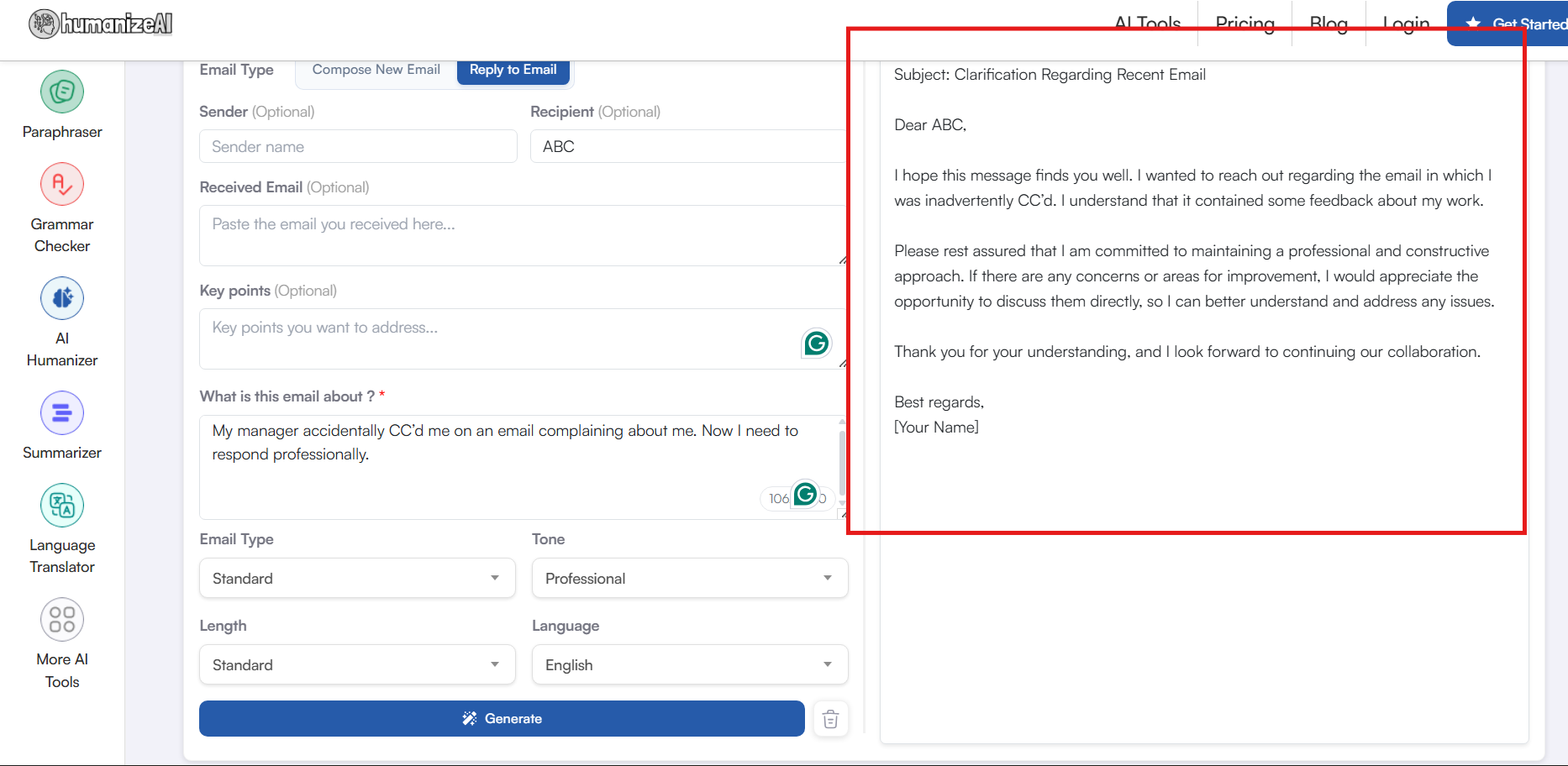
(To keep the test fair, we didn’t add any additional keypoints, nor did we change the email type.)
Tone Awareness
- The generated result has a relaxed yet professional tone throughout.
- There was no defensive language or unnecessary emotional trip that made the email difficult to comprehend.
- With HumanizeAI.io’s AI Email writer, you get next to no predictable patterns, phrases, or AI residue in the writing.
Context Handling
- The reason it is considered one of the best email writers is that it catches up with the intended context instantly.
- As you can see, it goes straight to feedback without escalating the conversation.
- Offers a space for constructive conversation, given the seriousness of the situation.
Natural Flow
- It feels like a natural workplace conversation where the employee seems genuinely concerned.
- The transitions in the sentences are natural and use a balanced structure.
Personalization Space
- There is a dedicated space to add customisations of keypoints to make the email read more personal.
- Avoids making assumptions on behalf of the sender or the writer and is guided by the inputs.
Ready to Send (Send Confidence): High
- Needs no manual edits.
Suitable For
- With its customizable modes and the ability to incorporate specific details, it’s safe to say this is a must-have tool for anyone who regularly sends emails.
- Moreover, with its multilingual support, it becomes a global tool that can deal with any given email situation.
2. Grammarly AI Email Writer
Even if you are new to AI, you are sure to be familiar with the name Grammarly. But what you might not know is that this household AI grammar checker with prompt and live suggestions also has a dedicated email writer. The page lands directly to the writing setup as it offers easy email writing solutions.
Features
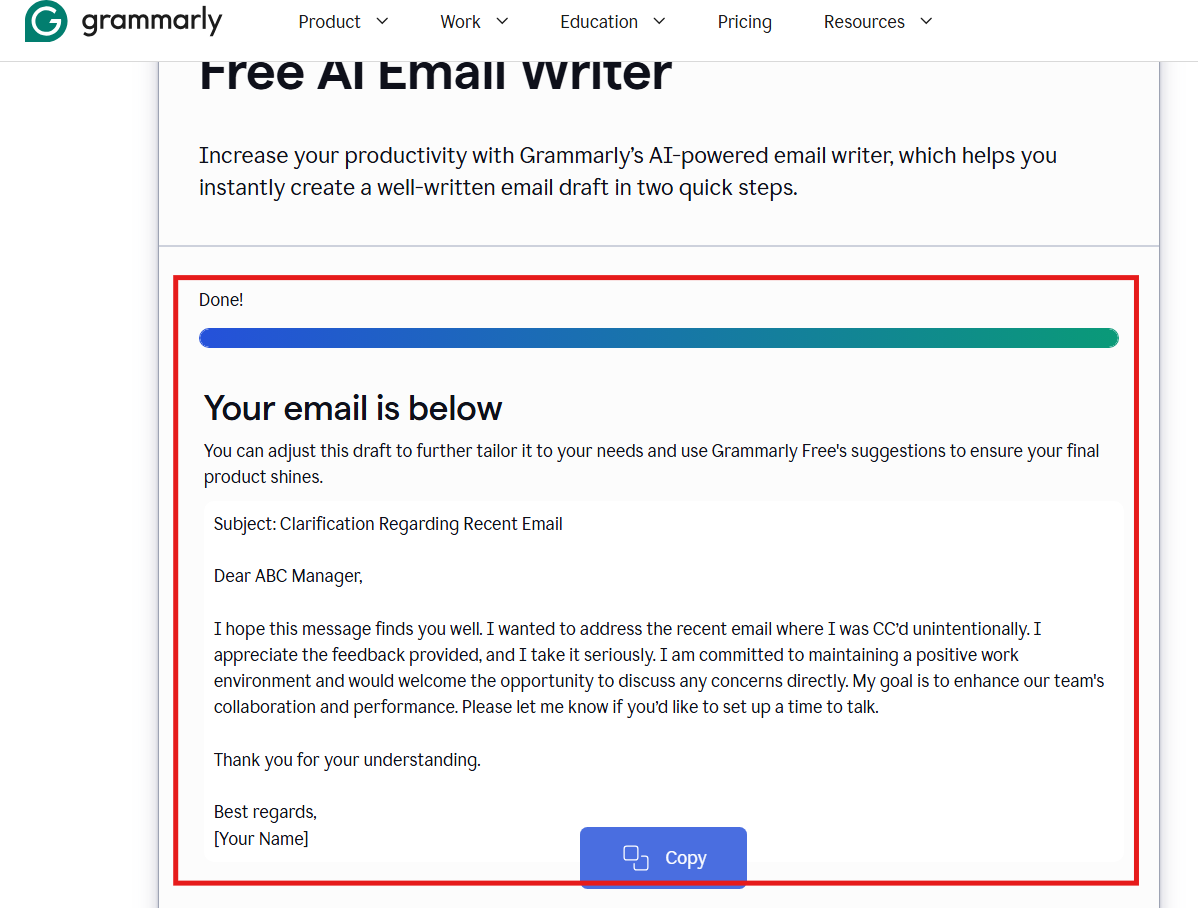
- The tool works in two simple steps and doesn’t allow much provision for customisations.
- All you can do is add your audience and explain the topic of the email, and that is it.
- However, it does help you with a dedicated app and an extension.
Tone Awareness
- There is a professional, formal, and neutral tone maintained throughout.
- It leans more towards a safe corporate discussion compared to something a real person might type.
- Since it lacks the basic functionalities to fine-tune tone and mood, writing other sensitive emails can be challenging.
Context Handling
- It responds to the scenario at a surface level and doesn’t acknowledge or engage with it in depth.
- Lacks options to include sender details, recipient context, or reply-specific inputs, which leads to more manual edits.
Natural Flow
- The email reads like its written on some predictable format or template available online.
- It mainly prioratizes on being correct over being conversational.
Personalization Space
- It has no dedicated personalization and hence relies heavily on manual edits.
Ready to Send (Send Confidence): Moderate
- Requires dedicated manual edits for sensitive level or highly layered situations like this one.
Suitable For
- If you are writing ground-level professional emails.
- When you are looking for the structure of an email rather than contextual relevance.
- Grammarly’s Email Writer works best for grammatical clarity ( as expected) rather than focusing on complex email scenarios.
3. QuillBot AI Email Writer
If you are chronically online, you are most definitely aware of QuillBot. One of the most high-end yet easy-to-use AI tools that operates on a fun interface. Even though it requires you to go through a quick sign-in process, it makes up for the delay with instant results. Moreover, QuillBot also offers multilingual assistance in 11 dedicated languages.
Features
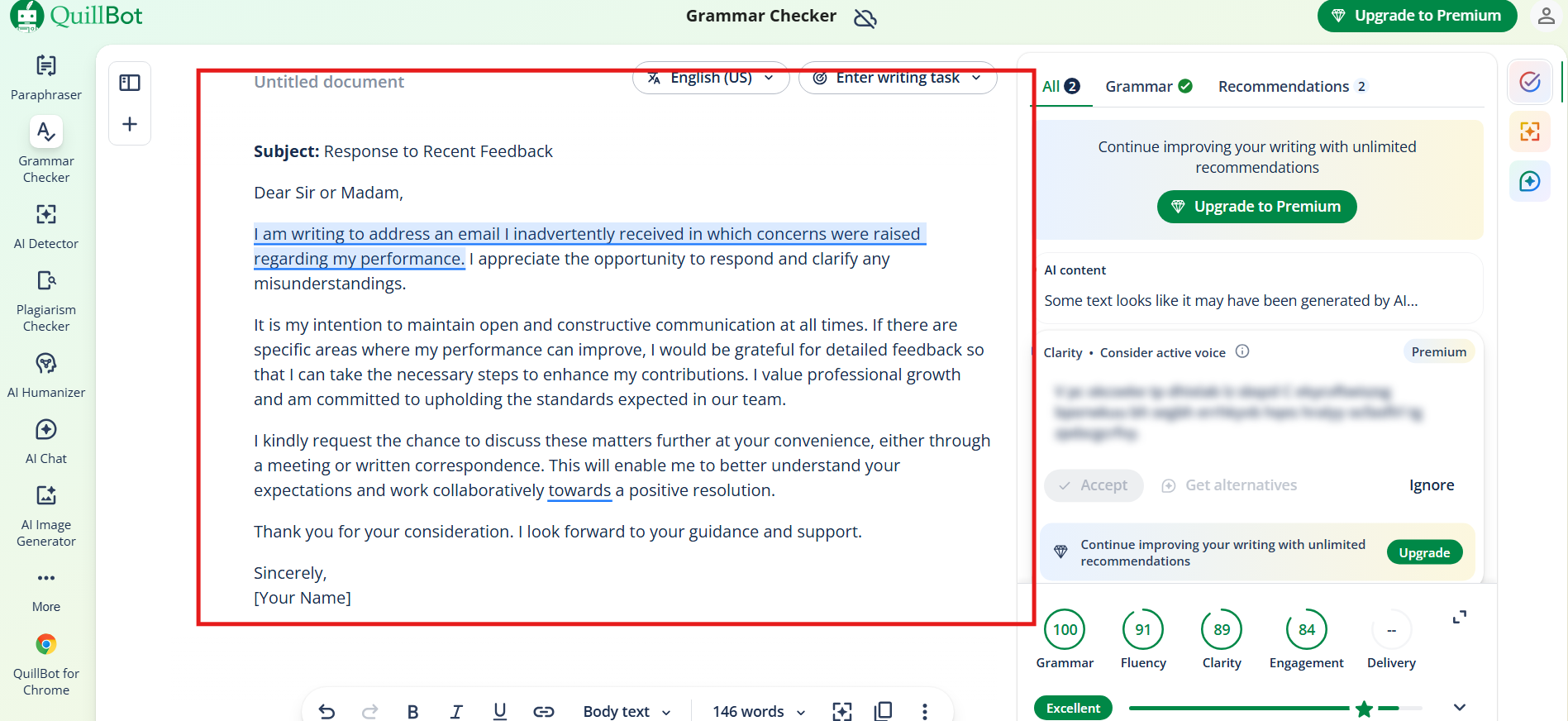
- QuillBot doesn’t need much to work with and generates results based on the email topic.
- Even though the process is relatively faster, it misses out on major customisations that add a more personal feel.
Tone Awareness
- QuillBot complicates the email with hefty words and makes the tone automatically stringent and academic.
- It doesn’t show the sensitivity that is required in a situation like this.
- Somehow it confuses between being professional and writing in a strict research paper tone.
Context Handling
- QuillBot acknowledges the gravity of the situation, but on a superficial level.
- The emotional nuance or sensitivity that is required to address a situation like this is missing from the emails.
- It feels more like a hand-me-down note than a real-time email response.
Natural Flow
- The tone was grammatically polished and structurally sound.
- But it read more like a formal letter instead of a conversational email.
Personalization Space
- There is no space for the user to add guided inputs to personalize the emails.
- No clear options to add key points, background, or reply-specific context.
Ready to Send (Send Confidence): Low
- Requires aggressive edits and tone softening before it can be tried and used in a workplace setting.
Suitable For
- When you need a quick check for your already independent written emails.
4. Rytr
Another popular entry on the list, Rytr, has been the talk of the town for ages. Settling in can be challenging with its layered features. However, as you move past the initial hiccups, writing emails with Rytr is fairly easy and intuitive.
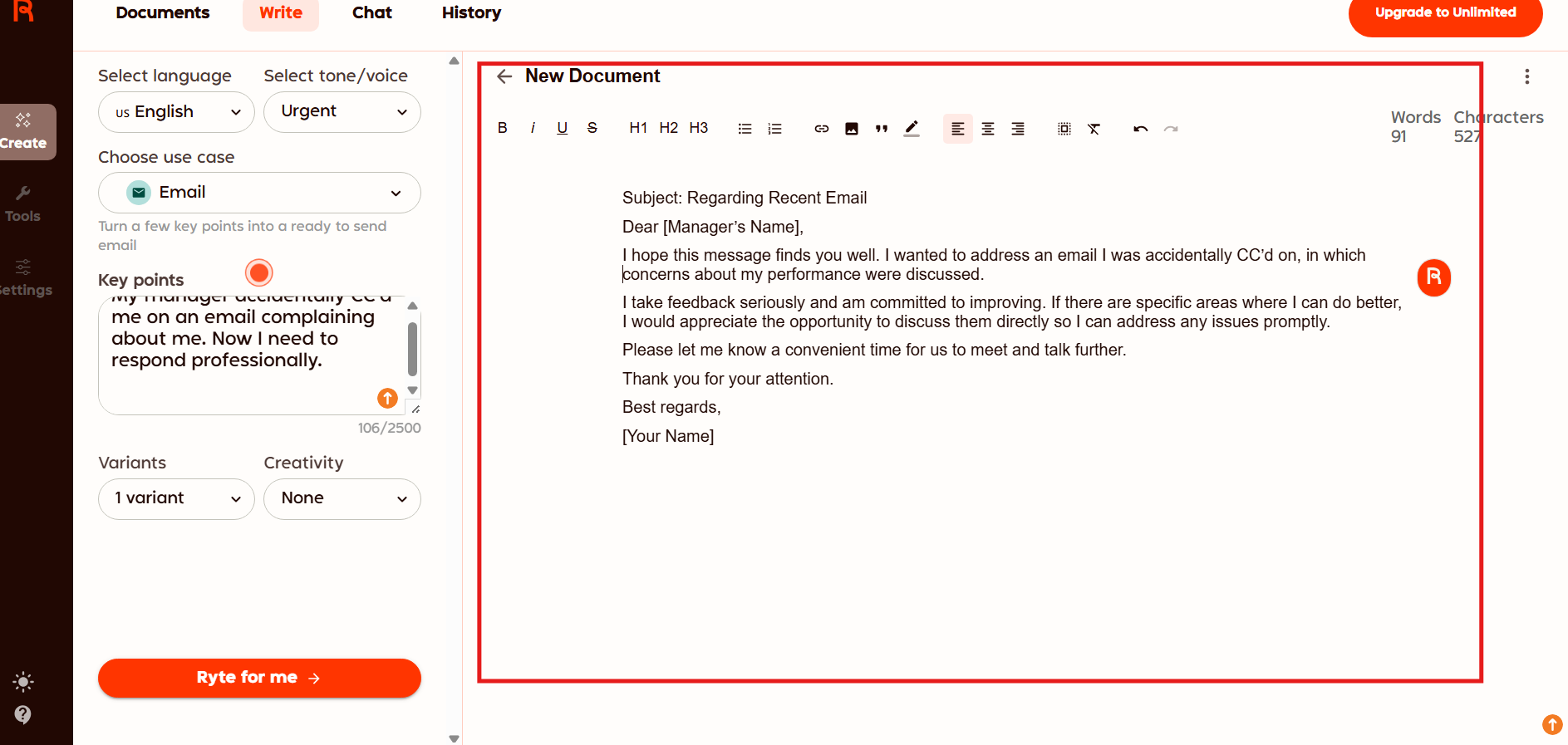
( Rytr doesn’t have a dedicated mode for professional emails, so we relied on the “Urgent” filter)
Features
- The tool opens to a dedicated dashboard that further leads to the email interface.
- It has some interesting customisations and modes like “Creativity” and “Tone/ Voice” to set the perfect premise for the emails.
Tone Awareness
- It presents a professional tone without sounding rigid, which is Suitable For workplace communication.
- However, you cannot add additional keypoints to make it more personalized or emotionally nuanced.
- It relies more on a direct and head-on templated approach rather than adding finer details of human conversation.
Context Handling
- Rtyr understands the seriousness of the situation quite efficiently without disrupting the process.
- However, the emotional sensitivity is missing, and it feels more like a task-based prompt.
Natural Flow
- Reading the email and keeping up with its flow is easy and comes naturally to the readers.
- However, a little bit of human assurance would have made the entire experience a bit better.
Personalization Space
- It aims for a more surface-level personalisation more than anything else.
- A quick brush of some nuanced details could have made Rytr one of the best tools in the market.
Ready to Send (send confidence): Moderate
- Some users might feel the need to soften the phrasing a bit before sending the email.
Suitable For
- Straightforward professional emails.
- Users who prefer structured outputs.
5. MailModo
Mailmodo enters the list with a variety of customisations and fun features that make the overall experience worth it. Even though it does have a dedicated pricing plan, it also offers a lifetime of free emails.
Features
- Mailmodo has a detailed lineup that makes writing emails easier, more contextual, and personalised.
- You get to decide the tone, the type of your campaign, and even the word count.
- The best part is that you can even set the audience and the theme for your email and add emojis as well.
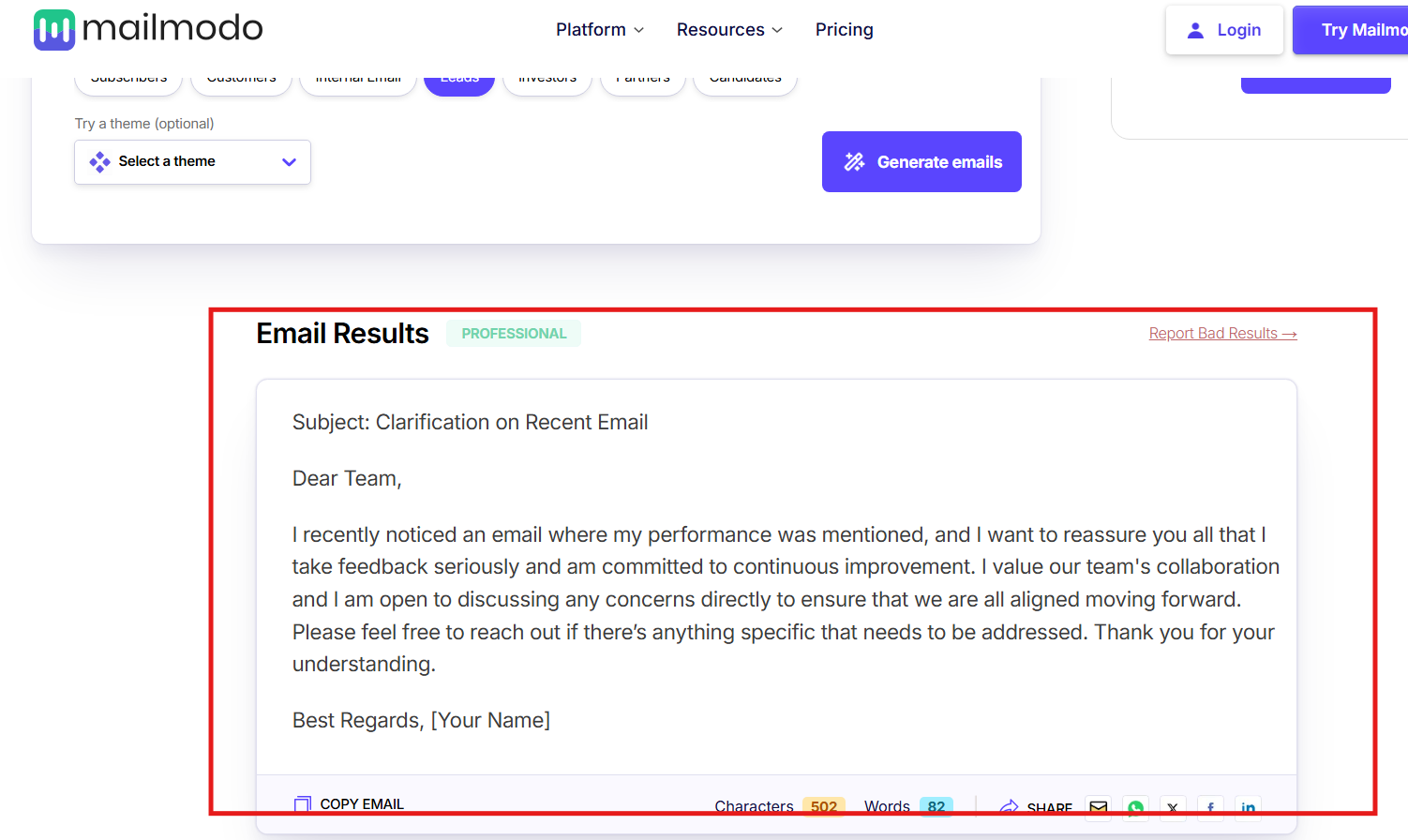
Tone Awareness
- Mailmodo relies on a safe and amicable style for its emails.
- It requires a more detailed approach towards sensitive situations like this one.
- However, it does maintain a polite and professional tone throughout.
Context Handling
- A bit more personalized approach could have made this experience almost perfect.
- It required a finer polish for one-on-one personalized conversations.
- Feels more like a broadcast message than a sensitive reply.
Personalization Space
- Mailmodo offers a dedicated level of customisations, but fails to create a space for a personalised approach.
- No clear option to include key points or other details for more detailed results.
Ready to Send (Send Confidence): Moderate
- It can be a risky bet for sensible workplace communication.
Suitable For
- General professional communication or team-wide generic announcements.
- It uses simple marketing-type phrasing suitable for quick conversations.
TLDR: Who Writes Like a Human (and Who Still Sounds Like AI)
Before you leave, and think all this was too much for you to process. Here is a quick, fun table. You can always refer to the screenshots later to understand and assess how HumanizeAI.io's AI Email Writer sweeps the review with authenticity email suggestions that reflect depth and context.
However, in the meantime, this is what it looks like for all the top 5 email writers in the market for 2026.
| AI Email Writer’s Brand’s Name | Tone Awareness | Context Handling | Natural Flow | Personalization Space | Ready-to-Send Confidence |
| HumanizeAI.io | Balanced | Intuitive | Natural | Flexible | High |
| Grammarly | Neutral | Surface | Templated | None | Moderate |
| QuillBot | Rigid | Shallow | Formal | None | Low |
| Rytr | Professional | Task-based | Structured | Limited | Moderate |
| Mailmodo | Polite | Broad | Broadcast | Adjustable | Moderate |